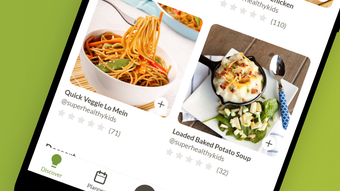

Download Prepear – meal planning, recipe app, grocery list, cookbooks, cooking, recipe organizer, meal planner, food planning, recipe sharing, healthy eating, meal prep, cooking app, food prep, cooking tools, meal planning app, recipe management, food organization, recipe collection, recipe database, recipe storage, recipe sharing app, recipe organizer app, cooking tools app, recipe app for Android, meal planning tools
Overview
Prepear is a free meal planning and recipe application designed for Android users seeking a streamlined approach to organizing their cooking routines. The app serves as a comprehensive tool for managing recipes, planning meals, and generating grocery lists, helping users reduce food waste and simplify weekly meal preparation. It is particularly suited for individuals and households focused on healthy eating, meal prep, and efficient kitchen workflows. By centralizing favorite recipes into customizable cookbooks, Prepear enables users to maintain a personal recipe database that grows with their culinary preferences.
Users can create and adjust meal plans across multiple days, easily rearranging meals with minimal effort. The app’s integration of automatic grocery list generation ensures that ingredients are pulled directly from planned meals and sorted into logical categories for convenient shopping. Whether users prefer to shop in person, order delivery, or pick up groceries curbside, Prepear supports flexible shopping workflows. The app also offers personalized meal suggestions based on past cooking habits and content from followed users, enhancing discovery and reducing decision fatigue.
Prepear’s interface emphasizes clarity and usability, with a recipe screen that displays ingredients and directions side-by-side. Users can check off cooking steps in real time, ensuring they stay on track without losing their place. The app’s design supports both casual home cooks and those managing complex weekly meal schedules, making it a practical solution for modern food planning.
Key Features & Capabilities
- Custom Recipe Organization: Save and categorize favorite recipes into personal cookbooks, enabling structured recipe storage and retrieval.
- Dynamic Meal Planning: Plan meals from breakfast to dinner across multiple days, with the ability to drag, rearrange, and adjust schedules in seconds.
- Automatic Grocery List Generation: Sync grocery lists with meal plans, automatically compiling ingredients and organizing them by category (e.g., produce, dairy, pantry).
- Real-Time Cooking Assistance: View ingredients and step-by-step directions together on a single screen, with the option to check off steps during preparation.
- Personalized Meal Suggestions: Receive tailored meal ideas based on previously cooked recipes and content from followed users.
- Recipe Sharing: Share cookbooks and individual recipes with friends and family, promoting collaboration and recipe exchange.
- Flexible Shopping Integration: Support for in-store shopping, delivery services, and curbside pickup options to match user preferences.
These features collectively reduce the cognitive load of meal planning and grocery shopping. For example, a user preparing for a busy week can input their preferred meals, and Prepear will generate a complete shopping list with categorized items, minimizing the need for manual tracking. The ability to follow other users introduces social elements, helping users discover new recipes and meal patterns. The integration of real-time cooking checklists ensures users remain engaged and focused during meal preparation, reducing the likelihood of mistakes or forgotten steps.
User Interface, Workflow & Performance
Prepear features a clean, intuitive interface optimized for Android devices, emphasizing visual clarity and responsive navigation. The layout prioritizes accessibility, with key functions—such as meal planning, recipe viewing, and grocery list management—placed within easy reach of the main screen. Users can navigate between sections with minimal taps, supporting a smooth and efficient workflow.
The app’s design supports both touch-based interactions and quick gestures, enabling fast adjustments to meal plans and recipe steps. Workflow efficiency is enhanced by the ability to reorder meals, duplicate recipes, and update grocery lists in real time. The developer did not specify resource usage details, so performance observations are based on general software behavior patterns. However, the app’s lightweight footprint of 48.7 MB suggests it is optimized for devices with moderate storage and memory.
Stability appears consistent with typical Android applications of similar scope, though exact crash rates or long-term reliability data were not provided. Users can expect smooth operation during routine tasks such as adding recipes, adjusting meal schedules, and checking off cooking steps. The app’s responsiveness during real-time cooking sessions indicates effective handling of user input and state updates.
Compatibility & System Requirements
Prepear is available exclusively on the Android platform, with version 2.1.3 released on March 25, 2023. The app has a file size of 48.7 MB, indicating a compact installation that does not require significant storage space. This makes it suitable for a wide range of Android devices, including mid-tier smartphones and tablets.
Exact system requirements were not listed by the developer. Compatibility information is limited to the Android operating system. While no specific minimum OS version was provided, the app is likely compatible with devices running Android 6.0 (Marshmallow) or later, based on common industry standards for similar applications. Users are advised to check their device’s compatibility before installation.
Installation is straightforward through the Google Play Store, with no additional dependencies or third-party tools required. The app does not require a constant internet connection for core functionality, allowing offline access to saved recipes and meal plans.
Pros and Cons
Pros
- Free to download and use with no in-app purchase barriers
- Intuitive interface designed for quick learning and daily use
- Automatic grocery list generation with category sorting
- Real-time cooking step tracking with check-off functionality
- Support for sharing recipes and cookbooks with others
- Personalized meal suggestions based on usage patterns
- Lightweight size (48.7 MB) suitable for older devices
Cons
- No information provided about iOS or desktop compatibility
- Exact system requirements not disclosed by the developer
- Limited to Android platform only
- Offline functionality details not specified
- No mention of cloud sync or backup features
FAQ Section
Is Prepear available for iOS devices?
Prepear is currently available only on the Android platform. There is no official version for iOS devices at this time.
Is Prepear safe to download and use?
Prepear is a free application available through the Google Play Store, which provides security checks for apps. As with any app, users should ensure they download it from official sources to maintain device safety.
Does Prepear require an internet connection?
Core features such as viewing saved recipes and meal plans can be used offline. However, some functions like personalized suggestions and recipe sharing may require an internet connection.
How often does Prepear receive updates?
Prepear was last updated on March 25, 2023. The frequency of future updates has not been disclosed by the developer.
What type of license does Prepear have?
Prepear is offered as free software with no subscription or paid features currently advertised. The exact licensing model is not specified in the available information.
Final Thoughts + CTA
Prepear stands out as a well-designed, practical tool for anyone looking to simplify meal planning, grocery shopping, and cooking. Its combination of automatic grocery list generation, real-time cooking assistance, and recipe sharing makes it a valuable asset for both novice and experienced home cooks. The app’s lightweight nature and free access enhance its accessibility across a broad user base.
While the lack of iOS support and incomplete system requirement details are notable limitations, the app’s core functionality remains robust and user-friendly. For Android users focused on healthy eating, meal prep, and efficient kitchen management, Prepear offers a compelling solution that streamlines daily routines.
Download Prepear now to transform your approach to meal planning and cooking.







